It is a standard laptop bag that can fit laptop with screens up to a 11.6 inches. With pouches and storage for power cords, business cards, and other relatively smaller essentials. Note that this is 24 pieces of laptop bag, there are options for 1-pack and 10-pack too. Be careful when you checkout the right quantity you need.
Scissors available in colors of purple, green and gray. The soft grip provides enought traction to avoid any loose or incorrect cuts. It is made from stainless steel, so you can be sure it will last a long time.
If you are looking to expand the memory card of your smart phone, tablet, camera, GoPro, Nintendo Switch or any other devices that used can hold microSDXC. It is a Class 10 and A2 in terms of its speed class. Available in 64GB, 128GB, 256GB, 512GB and 1TB.
This paper shredder available in different sizes that can cut multiple number paper at once. It also support cutting credit cards through a dedicated slot. A time savers for discarding confidential document and hopefully being recycled.
In order to stay focus you’d need to have one of these earphone. Block of the noise and/or provide focus to the task at hand. Compatible with any 3.5mm jack, including Android and iOS devices. The length of the cable is 3.9 foot or 118 cm.
No Back-to-School list is complete without a handy-dandy notebook. With 240 pages, line rules, 5 x 8.25 x.6 inch in dimensions and line ruled. It also has an integrated bookmark to keep track on where you stopped writing. The elastic enclosure is also a nice bonus as it will surely be kept organized in your bag.
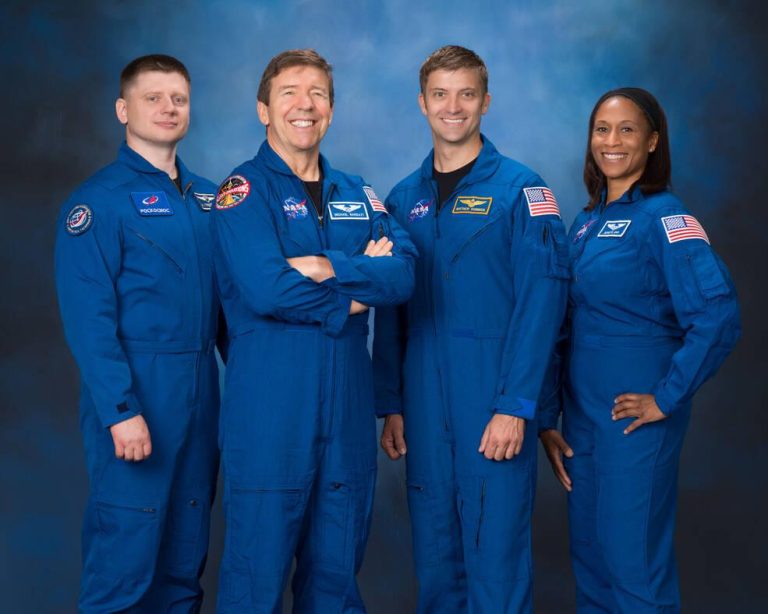
Four crew members now are assigned to launch on NASA’s SpaceX Crew-8 mission for a long-duration stay aboard the International Space Station.
NASA astronauts Commander Matthew Dominick, Pilot Michael Barratt, and Mission Specialist Jeanette Epps, along with Roscosmos cosmonaut Mission Specialist Alexander Grebenkin, will join Expedition 70 and 71 crew members aboard the station in early 2024 to conduct a wide-ranging set of operational and research activities.
This will be the first spaceflight for Dominick, who became a NASA astronaut in 2017. He is from Wheat Ridge, Colorado, and earned a bachelor’s degree in electrical engineering from the University of San Diego, California, and a master’s in systems engineering from the Naval Postgraduate School in Monterey, California. He is an active-duty U.S. Navy astronaut. He graduated from the U.S. Naval Test Pilot School in Patuxent River, Maryland, and then served as a test pilot specializing in testing landing on and catapult launches from U.S. Navy aircraft carriers.
This will be Barratt’s third trip to the space station. In 2009, Barratt served as a flight engineer for Expeditions 19 and 20 as the station transitioned its standard crew complement from three to six, and performed two spacewalks. He flew aboard the space shuttle Discovery in 2011 on STS-133, which delivered the Permanent Multipurpose Module and fourth Express Logistics Carrier. He has spent a total of 212 days in space. Born in Vancouver, Washington, he Considers Camas, Washington, to be his hometown. Barratt earned a bachelor’s in zoology from the University of Washington, Seattle, and a doctor of medicine from Northwestern University in Chicago, Illinois. He completed residencies in internal medicine at Northwestern and aerospace medicine along with a master’s degree at Wright State University in Dayton, Ohio. After nine years as a NASA flight surgeon and project physician, Barratt joined the astronaut corps in 2000.
This also will be Epps’ first trip to the space station. She is from Syracuse, New York, and earned a bachelor’s in physics from LeMoyne College in Syracuse, New York, and a master’s in science and a doctorate in aerospace engineering from the University of Maryland, College Park. Prior to joining NASA, she worked at Ford Motor Company and the Central Intelligence Agency. She was selected as an astronaut in July 2009, and has served on the Generic Joint Operation Panel working on space station crew efficiency, as a crew support astronaut for two expeditions, and as lead capsule communicator in the Mission Control Center at NASA’s Johnson Space Center in Houston. Epps previously was assigned to NASA’s Boeing Starliner-1 mission. NASA reassigned Epps to allow Boeing time to complete development of Starliner while also continuing plans for astronauts to gain spaceflight experience for future mission needs.
Grebenkin, who graduated from Irkutsk High Military Aviation School, Irkutsk, Russia, majoring in engineering, maintenance, and repair of aircraft radio navigation systems, also is flying on his first mission. He graduated from Moscow Technical University of Communications and Informatics with a degree in radio communications, broadcasting, and television.
This is the eighth rotational mission to the space station under NASA’s Commercial Crew Program, which works with the American aerospace industry to provide safe, reliable, and cost-effective transportation to and from the orbital outpost on American-made rockets and spacecraft launching from American soil.
For more than 22 years, humans have lived and worked continuously aboard the International Space Station, advancing scientific knowledge and demonstrating new technologies, making research breakthroughs not possible on Earth. As a global endeavor, 244 people from 19 countries have visited the unique microgravity laboratory that has hosted more than 3,000 research and educational investigations from researchers in 108 countries and areas.
The station is a critical testbed for NASA to understand and overcome the challenges of long-duration spaceflight and to expand commercial opportunities in low Earth orbit. As commercial companies focus on providing human space transportation services and destinations as part of a robust low Earth orbit economy, NASA is able to more fully focus its resources on deep space missions to the Moon and Mars.
Find more information on NASA’s Commercial Crew Program at:
https://www.nasa.gov/commercialcrew
-end-
Joshua Finch Headquarters, Washington 202-358-1100 [email protected]
Courtney Beasley Johnson Space Center, Houston 281-483-5111 [email protected]
This refillable notebook has guaranteed durability in its rings and cover. The patented Tech Lock rings will attest to it’s sturdiness. The size of the notebook it can hold is at 8-1/2 by 11 inches or simply called letter size. It can hold up to 200 sheets.
Perfect for projects, thesis and reports are these binders. Also at letter size, this binder can hold up from 1.5 to 3.0 inches in thickness of paper. It is also available in different colors such as Indigo blue, rose, and sage green.
Also called as the architect’s scale this scale can function as a ruler too. While you can opt to buy a plain ruler, this one ads the durability of being made from aluminum. But you can also choose the set where a plain ruler is included.
This college-ruled paper is comptable with our previous item, Refillable Notebook. Excelennt for note-taking, list making, assignments, and even hobbies such writing stories.
This pencil box, available in 3 colors, provide the optimal protection from damage. It also gives additional organization to your school supplies. While it’s called a pencil box, no one is stopping you from using it to group other things like crayons and brush.
This organizer is more versatile in categorizing your school supplies. From aesthetic supplies, emergency kits, cleaning kit and other relatively smaller items. Available in various colors and made from polyester.
Also at letter size, this divider can be used for additional grouping of your notes. Like dividing chapters from the book your are writing or grouping your financial records neatly.
This will provide you an organizer in style and versatility. It can be used as an attachment to a wall or the inside of your locker. But you can also position it a as tabletop piece. The gold color shows a touch of finesse when partnered with the environment.
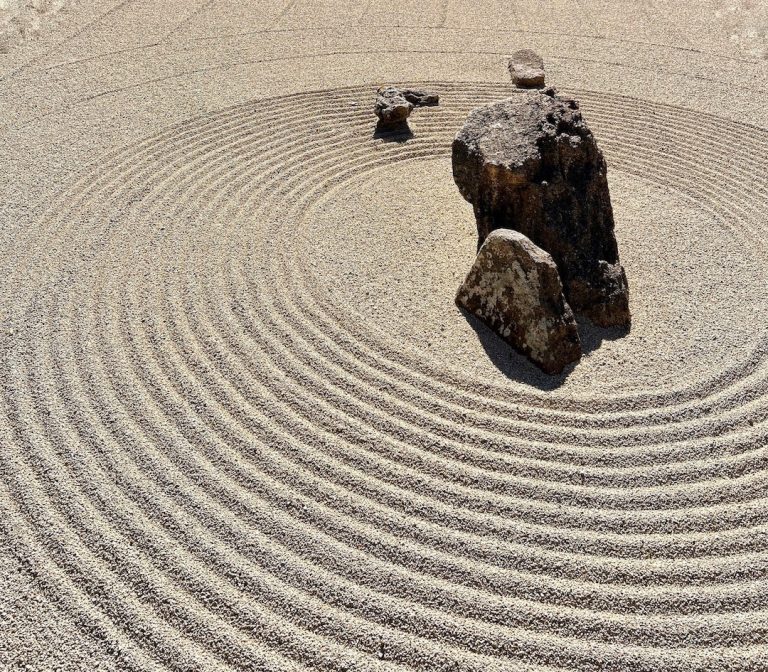
In a world chock-full of diversions and ever-mounting demands, conquering laziness can be a right challenge. But you can gain motivation from Japanese cultural concepts. By putting these 7 techniques into practice, you can boost your productivity and defeat procrastination.
1. Kaizen (Continuous Improvement)
Make small, daily enhancements through continuous refinement. Break tasks into manageable steps and build momentum with steady progress. The Japanese philosophy of kaizen focuses on consistent improvement through small, incremental changes. Set mini goals, tackle bite-sized objectives, and steadily build your skills, knowledge and progress. You’ll gain confidence and develop positive habits with each step forward. Before you know it, you’ll look back with a sense of achievement at the progress you’ve made through your commitment to gradual daily development.
2. Pomodoro Technique
Alternate 25-minute intense work sprints with 5-minute breaks, fuelling focus and combating fatigue. The Pomodoro technique is a time management method that uses a timer to break down work into intervals. Set a timer for 25 minutes and focus intently on your task until the timer rings. When your pomodoro is complete, reward yourself with a 5-minute break. Then repeat this cycle a few times, followed by a longer break. This technique alternates bursts of productive attention with recovery breaks, keeping you refreshed, engaged and alert. The regular rhythm of work sprints and breaks helps maintain motivation and combat restlessness or distractions.
3. Seiri, Seiton, Seiso (Organisation and Cleanliness)
Declutter, tidy and clean your workspace to clear your mind, reduce diversions and promote efficiency. Seiri, Seiton and Seiso are Japanese principles of organisation and cleanliness. Seiri means removing clutter, keeping only essential items and discarding what you don’t need. Seiton is about arranging items neatly and logically for ease of use. Seiso involves cleaning your environment and maintaining tidiness. Decluttering your workspace, organising your materials efficiently and upholding cleanliness clear physical and mental space. You’ll remove visual clutter and find what you need more easily. A tidy desk also leads to a tidy mindset, creating calm and removing mental obstacles to focus.
4. Kaizen-Muse (Creativity)
Kaizen-Muse creativity combines the small steps of kaizen with playful creative techniques. Instead of intimidating creative endeavours, take an experimental, improvisational approach of small, gradual improvements. Doodle, brainstorm and explore ideas casually without judging yourself. By blending structured kaizen with free-flowing creativity, you release the inner critic and fear of failure. Imperfect progress is better than no progress at all. Maintain momentum with mini creative milestones, embracing light-hearted experimentation over perfectionism.
5. Ikigai (Purpose)
Ikigai is the Japanese concept of your purpose or reason for living. Reflect on what you love, what you’re skilled at, what the world needs and what you can get paid for. Find the sweet spot where your passion, talent, mission and profession overlap. Discovering this purpose and meaning provides powerful motivation to show up each day. When your work aligns with your ikigai, you’ll gain fulfilment and an antidote to laziness.
6. Wabi-Sabi (Embracing Imperfection)
Wabi-sabi is the Japanese appreciation of imperfection and impermanence. Recognise that flaws are inevitable and even add character. Don’t demand perfection of yourself or others. Progress, not perfection, should be your goal. It’s better to take imperfect action than procrastinate due to fear of mistakes. Let go of unattainable standards that breed frustration and paralysis. Embrace wabi-sabi to create with freedom, courage and flexibility. You don’t have to be flawless to make progress. Doing something imperfectly still brings you a step forward.
Kaizen-teian means actively seeking ways to enhance processes through continuous improvement suggestions. Look for small ways to streamline or optimise any repeatable aspect of life and work. Identify inefficient spots in routines and systems. Then devise and suggest concrete ideas to fix them. By proactively trying to improve processes, you cultivate initiative and momentum. Instead of sticking with suboptimal comfort zones, suggest and implement changes for the better. Kaizen-teian gives you a sense of agency over your daily systems. You can shape your environment for productivity rather than succumb to frustration.
By integrating these techniques from Japanese culture, you can conquer laziness, boost your productivity and achieve your goals. Now go tap into the wisdom of Japan to defeat procrastination and make real progress!
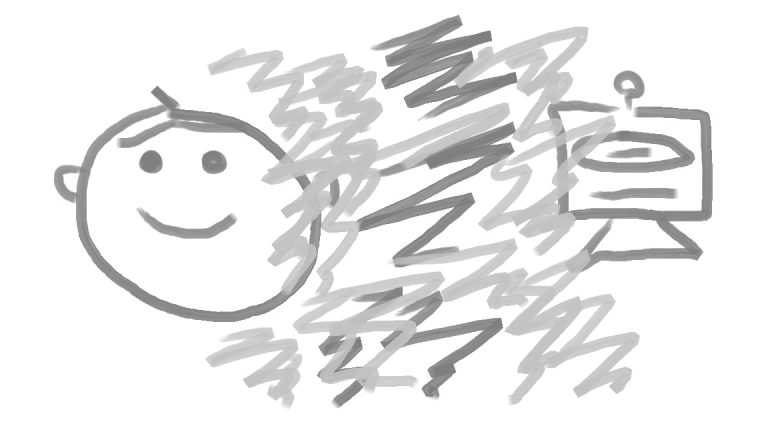
I just realised that the tables have really turned.
The machine(s) has/have won. ( There is a reason for that <=== ).
Once upon a time, in robotics and conversational systems or just regular HCI systems, we had to prove that it was a machine or a robot to other humans. That there were no human or Maxwell demon lurking behind the facade.
AND YEY! Breakthrough…
Now, as a former researcher and perennial enthusiast or practitioner, we now struggle to prove that this is authentically, just, me. Sure, some AI and ML apparent or abstracted, here and there. But. Ultimately. Human.
To prove it is purely human. Is now the breakthrough!
In life’s grand weave, where fate’s threads play, A dance of dreams, luck’s fleeting sway, Stars may guide, but do not bind, In our hearts, our paths we find.
Born to chance, yet not its slave, Bold we stand, steadfast and brave, Here and now, our canvas waits, A journey shaped by hands, not fates.
Luck may kiss, or turn away, Yet strength within holds true each day, No blame on stars, no unmarked way, In the present, our power lay.
Embrace the dance, the chaos, grace, Find your place in life’s embrace, For luck’s a guide, but not the key, In our souls, our destiny.
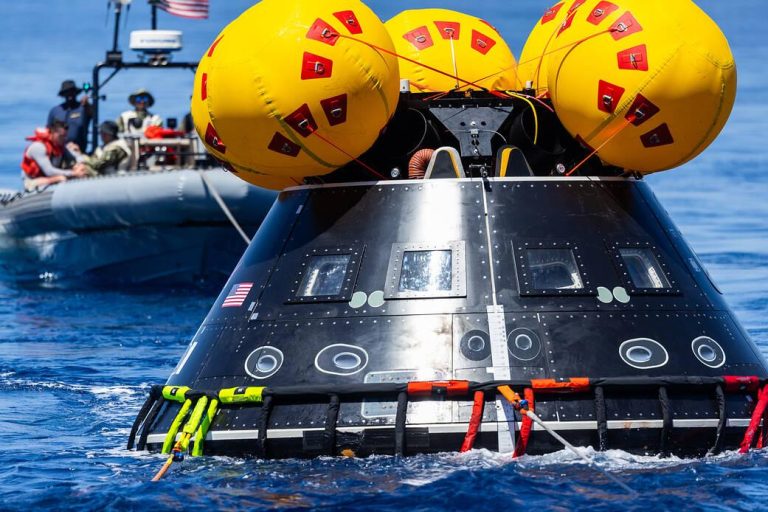
The Crew Module Test Article (CMTA), a full-scale mockup of NASA’s Orion spacecraft, is seen in the waters of the Pacific Ocean on July 26, 2023, during the first in a series of tests conducted by NASA and the Department of Defense to demonstrate and evaluate the processes, procedures, and hardware for recovery operations for crewed Artemis missions. This test is the first specifically in support of the Artemis II mission and allowed the team to practice what it will be like to recover astronauts and get them back to the recovery ship safely.
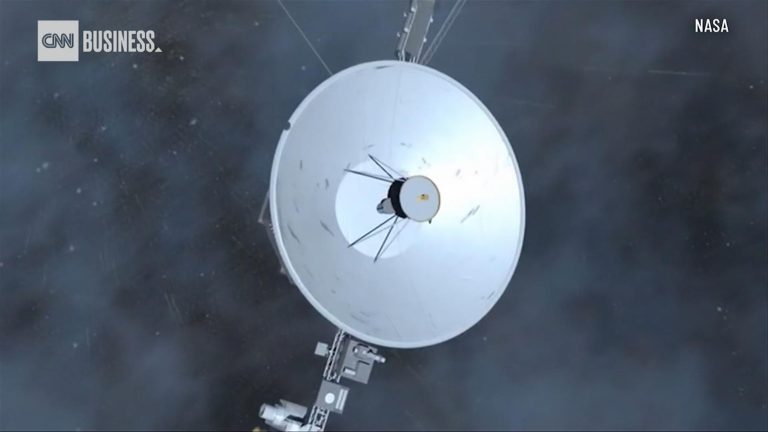
The Voyager mission team at NASA has been able to detect a signal from Voyager 2 after losing contact with the spacecraft, which has been operating for nearly 46 years.
“We enlisted the help of the (Deep Space Network) and Radio Science groups to help to see if we could hear a signal from Voyager 2,” said Suzanne Dodd, Voyager’s project manager at NASA’s Jet Propulsion Laboratory in Pasadena, California. “This was successful in that we see the ‘heartbeat’ signal from the spacecraft. So, we know the spacecraft is alive and operating. This buoyed our spirits.”
Commands sent to Voyager 2 on July 21 accidentally caused the spacecraft’s antenna to point 2 degrees away from Earth. The miniscule shift means that Voyager 2 can’t receive any commands from mission control or send data back to Earth from its location more than 12.3 billion miles (19.9 billion kilometers) in interstellar space.
The mission team was pleasantly surprised to be able to detect the spacecraft’s “carrier signal” using the Deep Space Network, an international array of massive radio antennas that allows NASA to communicate with missions across the cosmos.
Each of the three giant dishes are equidistant, meaning that one is always in communication with different spacecraft as Earth rotates. One radio antenna is located at Goldstone near Barstow, California, the second near Madrid, and the third near Canberra, Australia.
Now, the mission team will attempt to send a signal back to the spacecraft.
“We are now generating a new command to attempt to point the spacecraft antenna toward Earth,” Dodd said. “There is a low probability that this will work.”
‘Shouting’ into the cosmos
The signal, sent via the Deep Space Network, is basically an attempt to “shout” at Voyager 2 and try to get its attention, despite the fact that its antenna isn’t oriented in a way to receive the radio signal, according to NASA.
Given the distance between Voyager 2 and Earth, it takes about 18.5 hours for the signal to travel one way across the solar system to the spacecraft.
If the Earth-based signals don’t reach Voyager 2, the spacecraft is already programmed to reorient itself multiple times a year to keep its antenna pointing in Earth’s direction. The next reset was already scheduled for October 15, and the team is hopeful that this program will allow communications to resume with Voyager 2.
“But that is a long time to wait, so (we) will try sending up commands several times prior to that date,” Dodd said.
It’s not the first time that the aging twin probes, both launched in 1977, have experienced issues. As these “senior citizens” continue exploring the cosmos, the team has slowly turned off instruments to conserve power and extend their missions. Along the way, both Voyager 1 and 2 have encountered unexpected issues and dropouts, including a seven-month period where Voyager 2 and the Deep Space Network couldn’t communicate in 2020.
The team expects that Voyager 2 will remain on its planned trajectory, even without receiving commands. Meanwhile, Voyager 1, which is nearly 15 billion miles (24 billion kilometers) from Earth, continues to operate as expected and communicate with the Deep Space Network.
Both are in interstellar space and the only spacecraft to operate beyond the heliosphere, the sun’s bubble of magnetic fields and particles that extends well beyond the orbit of Pluto, collecting valuable data as they explore uncharted interstellar territory.
By: Ashley Strickland, CNN Originally published at CNN
Is there life on Venus? People have asked this question for as long as we’ve known that the bright object in the morning and evening skies was a planet.
Back when optical telescopes were the only tools humans had to peer into space, all we could see of our nearest celestial neighbor was a cloud-shrouded planet. Some scientists at the time thought that Venus might not be too different from Earth, since both planets are of similar size and have atmospheres. Perhaps, they thought, Venus was covered in humid swamps, filled with exotic alien creatures. In the 1960s when NASA and the Soviet space agency started using radar imaging technology to look beneath Venus’ clouds, this perception changed dramatically.
Today, we know Venus to be an extremely inhospitable environment. And yet the question of whether it could be home to life is still up for debate as scientists continue to discover new things about the mysterious world.
VENUS A global view of Venus created using images from NASA’s Mariner 10 spacecraft.Image: NASA/JPL/Mattias Malmer
What is Venus like today?
With extreme heat and crushing atmospheric pressure, the surface of Venus today is one of the deadliest environments in the Solar System.
Venus is the hottest planet in the Solar System, even though Mercury is twice as close to the Sun and receives four times more solar energy. At the surface, Venus has average temperatures of 470 degrees Celsius (878 degrees Fahrenheit) — hot enough to melt lead.
Venus is so hot because of its thick carbon dioxide atmosphere, which traps heat creating a runaway greenhouse effect. Fifty-four times more dense than Earth’s, it is the densest terrestrial atmosphere in the Solar System. The atmospheric pressure on the surface of Venus is about 92 bar, or 1,350 pounds per square inch. This is the equivalent of the pressure you’d experience if you were a kilometer (about 0.6 miles) underwater on Earth.
What was Venus like in the past?
Although Venus is a hellscape today, it likely used to have similar conditions to Earth: oceans of liquid water, a mild climate, and other characteristics that may have made it habitable.
Past missions to Venus have found evidence of granite-like rocks that would have required the presence of water to form. Because of hints like this, some scientists think the planet may have had liquid water on its surface for 2 billion years — far longer than Mars, which likely hosted surface water for a relatively brief 300 million years.
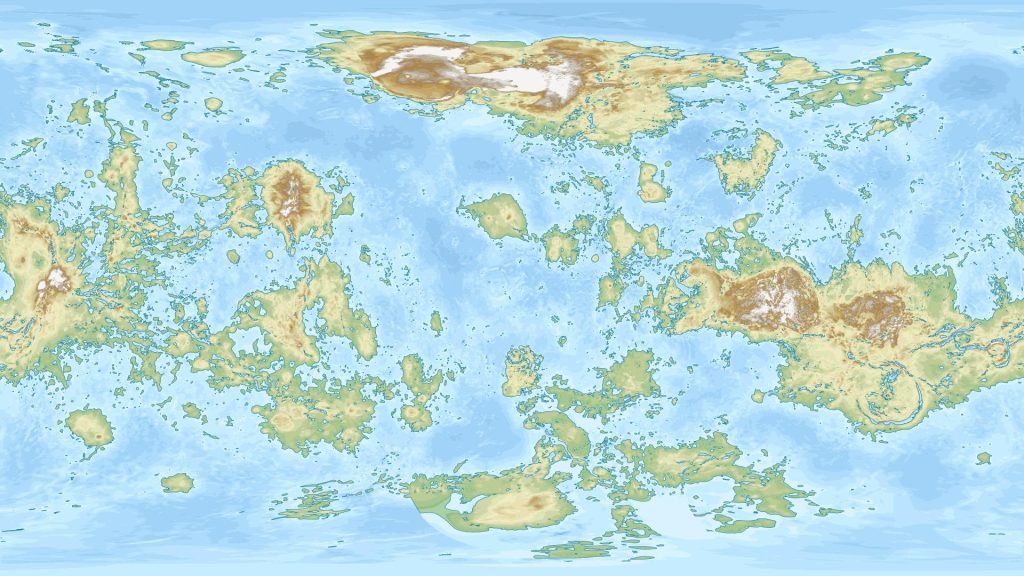
VENUS IF IT HAD OCEANS Data scientist Alexis Huet created this map showing what Venus would look like if it had the same amount of surface water as Earth.Image: Alexis Huet
Did life exist on Venus in the past?
Because liquid water is the key to life as we know it, if Venus had water on its surface for billions of years it’s possible that microbial life emerged during that time. We don’t know for sure, though, and looking for evidence of past life on Venus is almost impossible with current technologies.
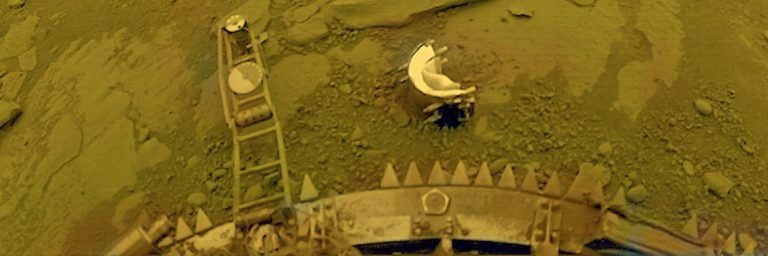
Although orbiters can teach us a lot about a planet, to search for signs of past life we need to take a much closer look. On Mars, we look for past microbial life by sending rovers like Curiosity and Perseverance to analyze rock samples. But Venus is a much more difficult place to explore on the surface. Only a handful of landers have successfully operated on the Venusian surface. Many more have tried and failed, but even the successful missions were only able to operate for hours at most before being destroyed by the planet’s extreme conditions. This doesn’t give spacecraft enough time to do things like collect and analyze rock samples to look for microscopic fossils.
Does life exist on Venus now?
Although life as we know it is almost certainly impossible in the harsh conditions on the surface of Venus, it’s possible that it could survive in the Venusian atmosphere. Although Venus’ lower atmosphere contains toxic clouds of sulfuric acid, at higher levels the conditions are much less deadly.
In 2020 scientists announced they found phosphine gas — a potential biosignature, i.e. a chemical strongly associated with biological processes — in Venus’ clouds 50 kilometers (roughly 31 miles) above the surface, where temperatures and pressures are much more Earth-like. Phosphine’s presence has since been disputed, then later reclaimed but with an alternative explanation for its origins, disputed once again, and redetected lower in the atmosphere. The verdict on whether phosphine exists in the clouds of Venus, and whether its presence would mean there were life forms producing it, is still very much undecided.
By: Kate Howells Originally published at The Planetary Society
LPython is a Python compiler that can compile type-annotated Python code to optimized machine code. LPython offers several backends such as LLVM, C, C++, WASM, Julia and x86. LPython features quick compilation and runtime performance, as we show in the benchmarks in this blog. LPython also offers Just-In-Time (JIT) compilation and seamless interoperability with CPython.
We are releasing an alpha version of LPython, meaning it is expected you encounter bugs when you use it (please report them!). You can install it using Conda (conda install -c conda-forge lpython), or build from source.
Based on the novel Abstract Semantic Representation (ASR) shared with LFortran, LPython’s intermediate optimizations are independent of the backends and frontends. The two compilers, LPython and LFortran, share all benefits of improvements at the ASR level. “Speed” is the chief tenet of the LPython project. Our objective is to produce a compiler that both runs exceptionally fast and generates exceptionally fast code.
In this blog, we describe features of LPython including Ahead-of-Time (AoT) compilation, JIT compilation, and interoperability with CPython. We also showcase LPython’s performance against its competitors such as Numba and C++ via several benchmarks.
Features of LPython
Backends
LPython ships with the following backends, which emit final translations of the user’s input code:
LLVM
C
C++
WASM
LPython can simultaneously generate code into multiple backends from its Abstract Semantic Representation (ASR) of user code.
Phases of Compilation
First, input code is transformed into an Abstract Syntax Tree (AST) using parsers. The AST is then transformed into an Abstract Semantic Representation (ASR), which preserves all semantic information present in the input code. ASR contains all information required by all backends in a form that is not specific to any particular backend. Then, this ASR enjoys several ASR-to-ASR passes, wherein abstract operations are transformed into concrete statements. For example, array addition in the input code denoted, c = a + b. The front end transforms c = a + b into the ASR (Assign c (ArrayAdd a b)) via operator overloading. The array_op ASR-to-ASR pass transforms (Assign c (ArrayAdd a b)) into loops:
for i0 in range(0, length_dim_0):
    for i1 in range(0, length_dim_1):
        ....
            ....
            c[i0, i1, ...] = a[i0, i1, ...] + b[i0, i1, ...]
After applying all the ASR-to-ASR passes, LPython sends the final ASR to the backends selected by the user, via command-line arguments like, --show-c (generates C code), --show-llvm (generates LLVM code).
One can also see the generated C or LLVM code using the following
from lpython import i32
def main():
    x: i32
    x = (2+3)*5
    print(x)
main()
LPython implements several machine-independent optimisations via ASR-to-ASR passes. Some of those are listed below,
Loop unrolling
Loop vectorisation
Dead code removal
Function call inlining
Transforming division to multiplication operation
Fused multiplication and addition
All optimizations are applied via one command-line argument, --fast. To select individual optimizations instead, write a command-line argument like the following:
--pass=inline_function_calls,loop_unroll
Following is an examples of ASR and transformed ASR after applying the optimisations
LPython naturally acts as a Python compiler. By default, if no backend is provided it compiles type-annotated user input code to LLVM, which generates binary final output. Consider the following small example:
from lpython import i32, i64
def list_bench(n: i32) -> i64:
    x: list[i32]
    x = []
    i: i32
    for i in range(n):
        x.append(i)
    s: i64 = i64(0)
    for i in range(n):
        s += i64(x[i])
    return s
res: i64 = list_bench(500_000)
print(res)
(lp) 18:58:29:~/lpython_project/lpython % lpython /Users/czgdp1807/lpython_project/debug.py -o a.out
(lp) 18:58:31:~/lpython_project/lpython % time ./a.out
124999750000
./a.out  0.01s user 0.00s system 89% cpu 0.012 total
You can see that it’s very fast. It’s still plenty fast with the C backend via the command-line argument --backend=c:
% time lpython /Users/czgdp1807/lpython_project/debug.py --backend=c
124999750000
lpython /Users/czgdp1807/lpython_project/debug.py --backend=c  0.12s user 0.02s system 100% cpu 0.144 total
Note that time lpython /Users/czgdp1807/lpython_project/debug.py --backend=c includes both the compilation time of LPython and the execution time of the binary. The sum of both is so fast that one can afford to compile on every change to the input files. :D.
Just-In-Time Compilation
Just-in-time compilation in LPython requires only decorating Python function with @lpython. The decorator takes an option for specifying the desired backend, as in, @lpython(backend="c") or @lpython(backend="llvm"). Only C is supported at present; LLVM and others will be added in the near future. The decorator also propagates backend-specific options. For example
Note that by default C backend is used without any optimisation flags.
A small example of JIT compilation in LPython (notice the LPython type annotations with the variables),
from lpython import i32, i64, lpython
@lpython(backend="c", backend_optimisation_flags=["-ffast-math", "-funroll-loops", "-O1"])
def list_bench(n: i32) -> i64:
    x: list[i32]
    x = []
    i: i32
    for i in range(n):
        x.append(i)
    s: i64 = i64(0)
    for i in range(n):
        s += i64(x[i])
    return s
res = list_bench(1) # compiles `list_bench` to a shared binary in the first call
res = list_bench(500_000) # calls the compiled `list_bench`
print(res)
We show below in the benchmarks how LPython compares to Numba, which also has JIT compilation.
Inter-operability with CPython
Access any library implemented using CPython, via the @pythoncall decorator. For example,
email_extractor.py
# get_email is implemented in email_extractor_util.py which is intimated to
# LPython by specifiying the file as module in `@pythoncall` decorator
@pythoncall(module="email_extractor_util")
def get_email(text: str) -> str:
    pass
def test():
    text: str = "Hello, my email id is [email protected]."
    print(get_email(text))
test()
Note: The @pythoncall and @lpython decorators are presently supported with just the C backend but eventually will work with the LLVM backend and that’s work in progress.
Benchmarks and Demos
In this section, we show how LPython performs compares to competitors on each feature LPython offers. We cover JIT compilation, Interoperability with CPython, and AoT compilation.
Just-In-Time (JIT) Compilation
We compare JIT compilation of LPython to Numba on summation of all the elements of a 1-D array, pointwise multiplication of two 1-D arrays, insertion sort on lists, and quadratic-time implementation of the Dijkstra shortest-path algorithm on a fully connected graph.
System Information
Compiler
Version
Numba
0.57.1
LPython
0.19.0
Python
3.10.4
Summation of all the elements of a 1-D array
from numpy import float64, arange, empty
from lpython import i32, f64, lpython
import timeit
from numba import njit
@lpython(backend="c", backend_optimisation_flags=["-ffast-math", "-funroll-loops", "-O3"])
def fast_sum(n: i32, x: f64[:], res: f64[:]) -> f64:
    s: f64 = 0.0
    res[0] = 0.0
    i: i32
    for i in range(n):
        s += x[i]
    res[0] = s
    return s
@njit(fastmath=True)
def fast_sum_numba(n, x, res):
    s = 0.0
    res[0] = 0.0
    for i in range(n):
        s += x[i]
    res[0] = s
    return s
def test():
    n = 100_000_000
    x = arange(n, dtype=float64)
    x1 = arange(0, dtype=float64)
    res = empty(1, dtype=float64)
    res_numba = empty(1, dtype=float64)
    print("LPython compilation time:", timeit.timeit(lambda: fast_sum(0, x1, res), number=1))
    print("LPython execution time: ", min(timeit.repeat(lambda: fast_sum(n, x, res), repeat=10, number=1)))
    assert res[0] == 4999999950000000.0
    print("Numba compilation time:", timeit.timeit(lambda: fast_sum_numba(0, x1, res_numba), number=1))
    print("Numba execution time:", min(timeit.repeat(lambda: fast_sum_numba(n, x, res_numba), repeat=10, number=1)))
    assert res_numba[0] == 4999999950000000.0
test()
Compiler
Compilation Time (s)
System
Relative
Numba
0.10
Apple M1 MBP 2020
1.00
LPython
0.20
Apple M1 MBP 2020
2.00
Numba
0.08
Apple M1 Pro MBP 2021
1.00
LPython
0.53
Apple M1 Pro MBP 2021
6.62
Numba
0.15
Apple M1 2020
1.00
LPython
0.40
Apple M1 2020
2.67
Numba
0.20
AMD Ryzen 5 2500U (Ubuntu 22.04)
1.00
LPython
0.32
AMD Ryzen 5 2500U (Ubuntu 22.04)
1.60
Compiler
Execution Time (s)
System
Relative
LPython
0.013
Apple M1 MBP 2020
1.00
Numba
0.024
Apple M1 MBP 2020
1.84
LPython
0.013
Apple M1 Pro MBP 2021
1.00
Numba
0.023
Apple M1 Pro MBP 2021
1.77
LPython
0.014
Apple M1 2020
1.00
Numba
0.024
Apple M1 2020
1.71
LPython
0.048
AMD Ryzen 5 2500U (Ubuntu 22.04)
1.00
Numba
0.048
AMD Ryzen 5 2500U (Ubuntu 22.04)
1.00
Pointwise multiplication of two 1-D arrays
from numpy import int64, arange, empty
from lpython import i32, i64, lpython
import timeit
from numba import njit
@lpython(backend="c", backend_optimisation_flags=["-ffast-math", "-funroll-loops", "-O3"])
def multiply_arrays(n: i32, x: i64[:], y: i64[:], z: i64[:]):
    i: i32
    for i in range(n):
        z[i] = x[i] * y[i]
@njit(fastmath=True)
def multiply_arrays_numba(n, x, y, z):
    for i in range(n):
        z[i] = x[i] * y[i]
def test():
    n = 100_000_000
    x1 = arange(0, dtype=int64)
    y1 = arange(0, dtype=int64)
    res1 = arange(0, dtype=int64)
    x = arange(n, dtype=int64)
    y = arange(n, dtype=int64) + 2
    res = empty(n, dtype=int64)
    res_numba = empty(n, dtype=int64)
    print("LPython compilation time:", timeit.timeit(lambda: multiply_arrays(0, x1, y1, res1), number=1))
    print("LPython execution time:", min(timeit.repeat(lambda: multiply_arrays(n, x, y, res), repeat=10, number=1)))
    assert sum(res - x * y) == 0
    print("Numba compilation time:", timeit.timeit(lambda: multiply_arrays_numba(0, x1, y1, res1), number=1))
    print("Numba execution time:", min(timeit.repeat(lambda: multiply_arrays_numba(n, x, y, res_numba), repeat=10, number=1)))
    assert sum(res_numba - x * y) == 0
test()
Compiler
Compilation Time (s)
System
Relative
Numba
0.11
Apple M1 MBP 2020
1.00
LPython
0.50
Apple M1 MBP 2020
4.54
Numba
0.09
Apple M1 Pro MBP 2021
1.00
LPython
0.60
Apple M1 Pro MBP 2021
6.67
Numba
0.11
Apple M1 2020
1.00
LPython
0.46
Apple M1 2020
4.18
Numba
0.21
AMD Ryzen 5 2500U (Ubuntu 22.04)
1.00
LPython
0.31
AMD Ryzen 5 2500U (Ubuntu 22.04)
1.48
Compiler
Execution Time (s)
System
Relative
Numba
0.041
Apple M1 MBP 2020
1.00
LPython
0.042
Apple M1 MBP 2020
1.02
Numba
0.037
Apple M1 Pro MBP 2021
1.00
LPython
0.040
Apple M1 Pro MBP 2021
1.08
Numba
0.042
Apple M1 2020
1.00
LPython
0.042
Apple M1 2020
1.00
Numba
0.21
AMD Ryzen 5 2500U (Ubuntu 22.04)
1.00
LPython
0.21
AMD Ryzen 5 2500U (Ubuntu 22.04)
1.00
Insertion sort on lists
from lpython import i32, lpython
import timeit
from numba import njit
@lpython(backend="c", backend_optimisation_flags=["-ffast-math", "-funroll-loops", "-O3"])
def test_list_sort(size: i32):
    i: i32
    x: list[i32]
    x = []
    for i in range(size):
        x.append(size - i)
    for i in range(1, size):
        key: i32 = x[i]
        j: i32 = i - 1
        while j >= 0 and key < x[j] :
            x[j + 1] = x[j]
            j -= 1
        x[j + 1] = key
    for i in range(1, size):
        assert x[i - 1] < x[i]
@njit(fastmath=True)
def test_list_sort_numba(size):
    x = []
    for i in range(size):
        x.append(size - i)
    for i in range(1, size):
        key = x[i]
        j = i - 1
        while j >= 0 and key < x[j] :
            x[j + 1] = x[j]
            j -= 1
        x[j + 1] = key
    for i in range(1, size):
        assert x[i - 1] < x[i]
def test():
    n = 25000
    print("LPython compilation time:", timeit.timeit(lambda: test_list_sort(0), number=1))
    print("LPython execution time:", min(timeit.repeat(lambda: test_list_sort(n), repeat=10, number=1)))
    print("Numba compilation time:", timeit.timeit(lambda: test_list_sort_numba(0), number=1))
    print("Numba execution time:", min(timeit.repeat(lambda: test_list_sort_numba(n), repeat=10, number=1)))
test()
Compiler
Compilation Time (s)
System
Relative
Numba
0.13
Apple M1 MBP 2020
1.00
LPython
0.20
Apple M1 MBP 2020
1.54
Numba
0.13
Apple M1 Pro MBP 2021
1.00
LPython
0.60
Apple M1 Pro MBP 2021
4.62
Numba
0.13
Apple M1 2020
1.00
LPython
0.42
Apple M1 2020
3.23
Numba
0.35
AMD Ryzen 5 2500U (Ubuntu 22.04)
1.00
LPython
0.37
AMD Ryzen 5 2500U (Ubuntu 22.04)
1.06
Compiler
Execution Time (s)
System
Relative
LPython
0.11
Apple M1 MBP 2020
1.00
Numba
0.39
Apple M1 MBP 2020
3.54
LPython
0.11
Apple M1 Pro MBP 2021
1.00
Numba
0.39
Apple M1 Pro MBP 2021
3.54
LPython
0.20
Apple M1 2020
1.00
Numba
0.39
Apple M1 2020
1.95
LPython
0.10
AMD Ryzen 5 2500U (Ubuntu 22.04)
1.00
Numba
0.36
AMD Ryzen 5 2500U (Ubuntu 22.04)
3.60
Quadratic-time implementation of the Dijkstra shortest-path algorithm on a fully connected graph
from lpython import i32, lpython
from numpy import empty, int32
from numba import njit
import timeit
@lpython(backend="c", backend_optimisation_flags=["-ffast-math", "-funroll-loops", "-O1"])
def dijkstra_shortest_path(n: i32, source: i32, dist_sum: i32[:]):
    i: i32; j: i32; v: i32; u: i32; mindist: i32; alt: i32; dummy: i32;
    graph: dict[i32, i32] = {}
    dist: dict[i32, i32] = {}
    prev: dict[i32, i32] = {}
    visited: dict[i32, bool] = {}
    Q: list[i32] = []
    for i in range(n):
        for j in range(n):
            graph[n * i + j] = abs(i - j)
    for v in range(n):
        dist[v] = 2147483647
        prev[v] = -1
        Q.append(v)
        visited[v] = False
    dist[source] = 0
    while len(Q) > 0:
        u = -1
        mindist = 2147483647
        for i in range(len(Q)):
            if mindist > dist[Q[i]]:
                mindist = dist[Q[i]]
                u = Q[i]
        Q.remove(u)
        visited[u] = True
        for v in range(n):
            if v != u and not visited[v]:
                alt = dist[u] + graph[n * u + v]
                if alt < dist[v]:
                    dist[v] = alt
                    prev[v] = u
    dist_sum[0] = 0
    for i in range(n):
        dist_sum[0] += dist[i]
@njit(fastmath=True)
def dijkstra_shortest_path_numba(n, source, dist_sum):
    graph = {}
    dist = {}
    prev = {}
    visited = {}
    Q = []
    for i in range(n):
        for j in range(n):
            graph[n * i + j] = abs(i - j)
    for v in range(n):
        dist[v] = 2147483647
        prev[v] = -1
        Q.append(v)
        visited[v] = False
    dist[source] = 0
    while len(Q) > 0:
        u = -1
        mindist = 2147483647
        for i in range(len(Q)):
            if mindist > dist[Q[i]]:
                mindist = dist[Q[i]]
                u = Q[i]
        Q.remove(u)
        visited[u] = True
        for v in range(n):
            if v != u and not visited[v]:
                alt = dist[u] + graph[n * u + v]
                if alt < dist[v]:
                    dist[v] = alt
                    prev[v] = u
    dist_sum[0] = 0
    for i in range(n):
        dist_sum[0] += dist[i]
def test():
    n: i32 = 4000
    dist_sum_array_numba = empty(1, dtype=int32)
    dist_sum_array = empty(1, dtype=int32)
    print("LPython compilation time: ", timeit.timeit(lambda: dijkstra_shortest_path(0, 0, dist_sum_array), number=1))
    print("LPython execution time: ", min(timeit.repeat(lambda: dijkstra_shortest_path(n, 0, dist_sum_array), repeat=5, number=1)))
    print(dist_sum_array[0])
    assert dist_sum_array[0] == i32(n * (n - 1)/2)
    print("Numba compilation time: ", timeit.timeit(lambda: dijkstra_shortest_path_numba(0, 0, dist_sum_array_numba), number=1))
    print("Numba execution time: ", min(timeit.repeat(lambda: dijkstra_shortest_path_numba(n, 0, dist_sum_array_numba), repeat=5, number=1)))
    print(dist_sum_array_numba[0])
    assert dist_sum_array_numba[0] == i32(n * (n - 1)/2)
test()
Compiler
Compilation Time (s)
System
Relative
LPython
0.35
Apple M1 MBP 2020
1.00
Numba
0.81
Apple M1 MBP 2020
2.31
LPython
0.69
Apple M1 Pro MBP 2021
1.00
Numba
0.73
Apple M1 Pro MBP 2021
1.05
LPython
0.21
Apple M1 2020
1.00
Numba
0.73
Apple M1 2020
3.47
LPython
1.08
AMD Ryzen 5 2500U (Ubuntu 22.04)
1.00
Numba
1.69
AMD Ryzen 5 2500U (Ubuntu 22.04)
1.56
Compiler
Execution Time (s)
System
Relative
LPython
0.23
Apple M1 MBP 2020
1.00
Numba
1.01
Apple M1 MBP 2020
4.39
LPython
0.20
Apple M1 Pro MBP 2021
1.00
Numba
0.98
Apple M1 Pro MBP 2021
4.90
LPython
0.27
Apple M1 2020
1.00
Numba
0.98
Apple M1 2020
3.63
LPython
0.87
AMD Ryzen 5 2500U (Ubuntu 22.04)
1.00
Numba
1.95
AMD Ryzen 5 2500U (Ubuntu 22.04)
2.24
Ahead-of-Time (AoT) Compilation
Next, we see how LPython compares to other AoT compilers and to the standard CPython interpreter. The tasks considered are quadratic-time implementation of the Dijkstra shortest-path algorithm on a fully connected graph, and Floyd-Warshall algorithm on array representation of graphs.
System Information
Compiler
Version
clang++
14.0.3
g++
11.3.0
LPython
0.19.0
Python
3.10.4
Quadratic-time implementation of the Dijkstra shortest-path algorithm on a fully connected graph
from lpython import i32
def dijkstra_shortest_path(n: i32, source: i32) -> i32:
    i: i32; j: i32; v: i32; u: i32; mindist: i32; alt: i32; dummy: i32; uidx: i32
    dist_sum: i32;
    graph: dict[i32, i32] = {}
    dist: dict[i32, i32] = {}
    prev: dict[i32, i32] = {}
    visited: dict[i32, bool] = {}
    Q: list[i32] = []
    for i in range(n):
        for j in range(n):
            graph[n * i + j] = abs(i - j)
    for v in range(n):
        dist[v] = 2147483647
        prev[v] = -1
        Q.append(v)
        visited[v] = False
    dist[source] = 0
    while len(Q) > 0:
        u = -1
        mindist = 2147483647
        for i in range(len(Q)):
            if mindist > dist[Q[i]]:
                mindist = dist[Q[i]]
                u = Q[i]
                uidx = i
        dummy = Q.pop(uidx)
        visited[u] = True
        for v in range(n):
            if v != u and not visited[v]:
                alt = dist[u] + graph[n * u + v]
                if alt < dist[v]:
                    dist[v] = alt
                    prev[v] = u
    dist_sum = 0
    for i in range(n):
        dist_sum += dist[i]
    return dist_sum
def test():
    n: i32 = 4000
    print(dijkstra_shortest_path(n, 0))
test()
#include <iostream>
#include <unordered_map>
#include <vector>
int32_t dijkstra_shortest_path(int32_t n, int32_t source) {
    int32_t i, j, v, u, mindist, alt, dummy, uidx;
    std::unordered_map<int32_t, int32_t> graph, dist, prev;
    std::unordered_map<int32_t, bool> visited;
    std::vector<int32_t> Q;
    for(i = 0; i < n; i++) {
        for(j = 0; j < n; j++) {
            graph[n * i + j] = std::abs(i - j);
        }
    }
    for(v = 0; v < n; v++) {
        dist[v] = 2147483647;
        prev[v] = -1;
        Q.push_back(v);
        visited[v] = false;
    }
    dist[source] = 0;
    while(Q.size() > 0) {
        u = -1;
        mindist = 2147483647;
        for(i = 0; i < Q.size(); i++) {
            if( mindist > dist[Q[i]] ) {
                mindist = dist[Q[i]];
                u = Q[i];
                uidx = i;
            }
        }
        Q.erase(Q.begin() + uidx);
        visited[u] = true;
        for(v = 0; v < n; v++) {
            if( v != u and not visited[v] ) {
                alt = dist[u] + graph[n * u + v];
                if( alt < dist[v] ) {
                    dist[v] = alt;
                    prev[v] = u;
                }
            }
        }
    }
    int32_t dist_sum = 0;
    for(i = 0; i < n; i++) {
        dist_sum += dist[i];
    }
    return dist_sum;
}
int main() {
    int32_t n = 4000;
    int32_t dist_sum = dijkstra_shortest_path(n, 0);
    std::cout<<dist_sum<<std::endl;
    return 0;
}
Compiler/Interpreter
Execution Time (s)
System
Relative
LPython
0.167
Apple M1 MBP 2020
1.00
Clang++
0.993
Apple M1 MBP 2020
5.95
Python
3.817
Apple M1 MBP 2020
22.86
LPython
0.155
Apple M1 Pro MBP 2021
1.00
Clang++
0.685
Apple M1 Pro MBP 2021
4.41
Python
3.437
Apple M1 Pro MBP 2021
22.17
LPython
0.324
Apple M1 2020
1.00
Clang++
0.709
Apple M1 2020
2.19
Python
3.486
Apple M1 2020
10.76
LPython
0.613
AMD Ryzen 5 2500U (Ubuntu 22.04)
1.00
g++
1.358
AMD Ryzen 5 2500U (Ubuntu 22.04)
2.21
Python
7.365
AMD Ryzen 5 2500U (Ubuntu 22.04)
12.01
Note the optimization flags furnished to each compiler.
Compiler/Interpreter
Optimization flags used
LPython
--fast
Clang++
-ffast-math -funroll-loops -O3
g++
-ffast-math -funroll-loops -O3
Python
–
Floyd-Warshall algorithm on array representation of graphs
from lpython import i64, i32
from numpy import empty, int64
def floyd_warshall(size: i32) -> i64:
    dist: i64[size, size] = empty((size, size), dtype=int64)
    u: i32; v: i32
    i: i32; j: i32; k: i32
    update: i64 = i64(0)
    for u in range(size):
        for v in range(size):
            dist[u, v] = i64(2147483647)
    for u in range(size):
        for v in range(size):
            if u != v and ((u%2 == 0 and v%2 == 1)
                           or (u%2 == 1 and v%2 == 0)):
                dist[u, v] = i64(u + v)
    for v in range(size):
        dist[v, v] = i64(0)
    update = i64(0)
    for k in range(size):
        for i in range(size):
            for j in range(size):
                if dist[i, j] > dist[i, k] + dist[k, j]:
                    update += dist[i, j] - dist[i, k] - dist[k, j]
                    dist[i, j] = dist[i, k] + dist[k, j]
    return update
print(floyd_warshall(1000))
Note the optimization flags furnished to each compiler.
Compiler/Interpreter
Optimization flags used
LPython
--fast
Clang++
-ffast-math -funroll-loops -O3
g++
-ffast-math -funroll-loops -O3
Python
–
Interoperability with CPython
Next we show that LPython can call functions in CPython libraries. This feature permits “break-out” to Numpy, TensorFlow, PyTorch, and even to matplotlib. The break-outs will run at ordinary (slow) Python speeds, but LPython accelerates the mathematical portions to near maximum speed.
Calling NumPy functions via CPython
main.py
from lpython import i32, f64, i64, pythoncall, Const, TypeVar
from numpy import empty, int32, float64
n_1 = TypeVar("n_1")
n_2 = TypeVar("n_2")
n_3 = TypeVar("n_3")
@pythoncall(module = "util")
def cpython_add(n_1: i32, a: i32[:], b: i32[:]) -> i32[n_1]:
    pass
@pythoncall(module = "util")
def cpython_multiply(n_1: i32, n_2: i32, a: f64[:], b: f64[:]) -> f64[n_1, n_2]:
    pass
def test_1D():
    n: Const[i32] = 500_000
    a: i32[n] = empty(n, dtype = int32)
    b: i32[n] = empty(n, dtype = int32)
    i: i32
    for i in range(n):
        a[i] = 2 * (i+1) * 13
        b[i] = a[i] + 2
    sum: i32[n]
    sum = cpython_add(500_000, a, b)
    for i in range(n):
        assert sum[i] == a[i] + b[i]
def test_2D():
    n: Const[i32] = 1_000
    a: f64[n] = empty([n], dtype = float64)
    b: f64[n] = empty([n], dtype = float64)
    i: i32; j: i32
    for i in range(n):
        a[i] = f64(i + 13)
        b[i] = i * 2 / (i + 1)
    product: f64[n, n]
    product = cpython_multiply(1_000, 1_000, a, b)
    for i in range(n):
        assert product[i] == a[i] * b[i]
def test():
    test_1D()
    test_2D()
test()
util.py
import numpy as np
def cpython_add(n, a, b):
    return np.add(a, b)
def cpython_multiply(n, m, a, b):
    return np.multiply(a, b)
(lp) 23:02:55:~/lpython_project % lpython main.py --backend=c --link-numpy
(lp) 23:03:10:~/lpython_project % # Works successfully without any asserts failing
Plotting graphs via Matplotlib
main.py
from lpython import f64, i32, pythoncall, Const
from numpy import empty, float64
@pythoncall(module = "util")
def plot_graph(x: f64[:], y1: f64[:], y2: f64[:], y3: f64[:]):
    pass
def f(x: f64, i: f64) -> f64:
    return x ** .5 / i
def test():
    n: Const[i32] = 100000
    x: f64[n] = empty(n, dtype=float64)
    y1: f64[n] = empty(n, dtype=float64)
    y2: f64[n] = empty(n, dtype=float64)
    y3: f64[n] = empty(n, dtype=float64)
    i: i32
    for i in range(1, n):
        x[i] = f64(i)
    for i in range(1, n):
        y1[i] = f(x[i], 1.)
        y2[i] = f(x[i], 2.)
        y3[i] = f(x[i], 3.)
    plot_graph(x, y1, y2, y3)
test()
(lp) 23:09:08:~/lpython_project % lpython main.py --backend=c --link-numpy
(lp) 23:10:44:~/lpython_project % # Works see the graph below
Visualization using Matplotlib: Mandelbrot Set
main.py
from lpython import i32, f64, pythoncall, TypeVar
from numpy import empty, int32
h = TypeVar("h")
w = TypeVar("w")
d = TypeVar("d")
@pythoncall(module="util")
def show_img_gray(w: i32, h: i32, A: i32[h, w]):
    pass
@pythoncall(module="util")
def show_img_color(w: i32, h: i32, d: i32, A: i32[h, w, d]):
    pass
def main0():
    Nx: i32 = 600; Ny: i32 = 450; Nz: i32 = 4; n_max: i32 = 255
    xcenter: f64 = f64(-0.5); ycenter: f64 = f64(0.0)
    width: f64 = f64(4); height: f64 = f64(3)
    dx_di: f64 = width/f64(Nx); dy_dj: f64 = -height/f64(Ny)
    x_offset: f64 = xcenter - f64(Nx+1)*dx_di/f64(2.0)
    y_offset: f64 = ycenter - f64(Ny+1)*dy_dj/f64(2.0)
    i: i32; j: i32; n: i32; idx: i32
    x: f64; y: f64; x_0: f64; y_0: f64; x_sqr: f64; y_sqr: f64
    image: i32[450, 600] = empty([Ny, Nx], dtype=int32)
    image_color: i32[450, 600, 4] = empty([Ny, Nx, Nz], dtype=int32)
    palette: i32[4, 3] = empty([4, 3], dtype=int32)
    for j in range(Ny):
        y_0 = y_offset + dy_dj * f64(j + 1)
        for i in range(Nx):
            x_0 = x_offset + dx_di * f64(i + 1)
            x = 0.0; y = 0.0; n = 0
            while(True):
                x_sqr = x ** 2.0
                y_sqr = y ** 2.0
                if (x_sqr + y_sqr > f64(4) or n == n_max):
                    image[j,i] = 255 - n
                    break
                y = y_0 + f64(2.0) * x * y
                x = x_0 + x_sqr - y_sqr
                n = n + 1
    palette[0,0] =   0; palette[0,1] = 135; palette[0,2] =  68
    palette[1,0] =   0; palette[1,1] =  87; palette[1,2] = 231
    palette[2,0] = 214; palette[2,1] =  45; palette[2,2] =  32
    palette[3,0] = 255; palette[3,1] = 167; palette[3,2] =   0
    for j in range(Ny):
        for i in range(Nx):
            idx = image[j,i] - i32(image[j,i]/4)*4
            image_color[j,i,0] = palette[idx,0] # Red
            image_color[j,i,1] = palette[idx,1] # Green
            image_color[j,i,2] = palette[idx,2] # Blue
            image_color[j,i,3] = 255            # Alpha
    show_img_gray(Nx, Ny, image)
    show_img_color(Nx, Ny, Nz, image_color)
    print("Done.")
main0()
util.py
def show_img_gray(w, h, A):
    from matplotlib import pyplot as plt
    plt.imshow(A, cmap='gray')
    plt.show()
    plt.close()
def show_img_color(w, h, d, A):
    from matplotlib import pyplot as plt
    plt.imshow(A)
    plt.show()
    plt.close()
$ ls
main.py util.py
$ lpython main.py --backend=c --link-numpy
Done.
Conclusion
The benchmarks support the claim that LPython is competitive with its competitors in all features it offers. In JIT, the execution times of LPython-compiled functions are at least as short as equivalent Numba functions. The speed of JIT compilation, itself, is slow in some cases because it currently depends on a C compiler to generate optimal binary code. For algorithms with rich data structures like dict (hash maps) and list, LPython shows much faster speed than Numba. In AoT compilation for tasks like the Dijkstra algorithm, LPython beats equivalent C++ code very comfortably. For an array-based implementation of the Floyd-Warshall algorithm, LPython generates code almost as fast as C++ does.
The main takeaway is that LPython/LFortran generate fast code by default. Our benchmarks show that it’s straightforward to write high-speed LPython code. We hope to raise expectations that LPython output will be in general at least as fast as the equivalent C++ code. Users love Python because of its many productivity advantages: great tooling, easy syntax, and rich data structures like lists, dicts, sets, and arrays. Because any LPython program is also an ordinary Python program, all the tools – debuggers and profilers, for instance – just work. Then, LPython delivers run-time speeds, even with rich data structures at least as short as alternatives in most cases.
By: Ondřej Čertík, Brian Beckman, Gagandeep Singh, Thirumalai Shaktivel, Smit Lunagariya, Ubaid Shaikh, Naman Gera, Pranav Goswami, Rohit Goswami, Dominic Poerio, Akshānsh Bhatt, Virendra Kabra and Luthfan Lubis Originally published at LPython Blog